Documentation
Call handling and forwarding
When someone calls one of your numbers, you decide what happens next: the AI receptionist answers, your app rings, or the call goes straight to another phone. You can also let the assistant transfer a live caller to you, record calls, and have a silent co-pilot help when you take a call yourself. Everything here is set per number under Call handling.
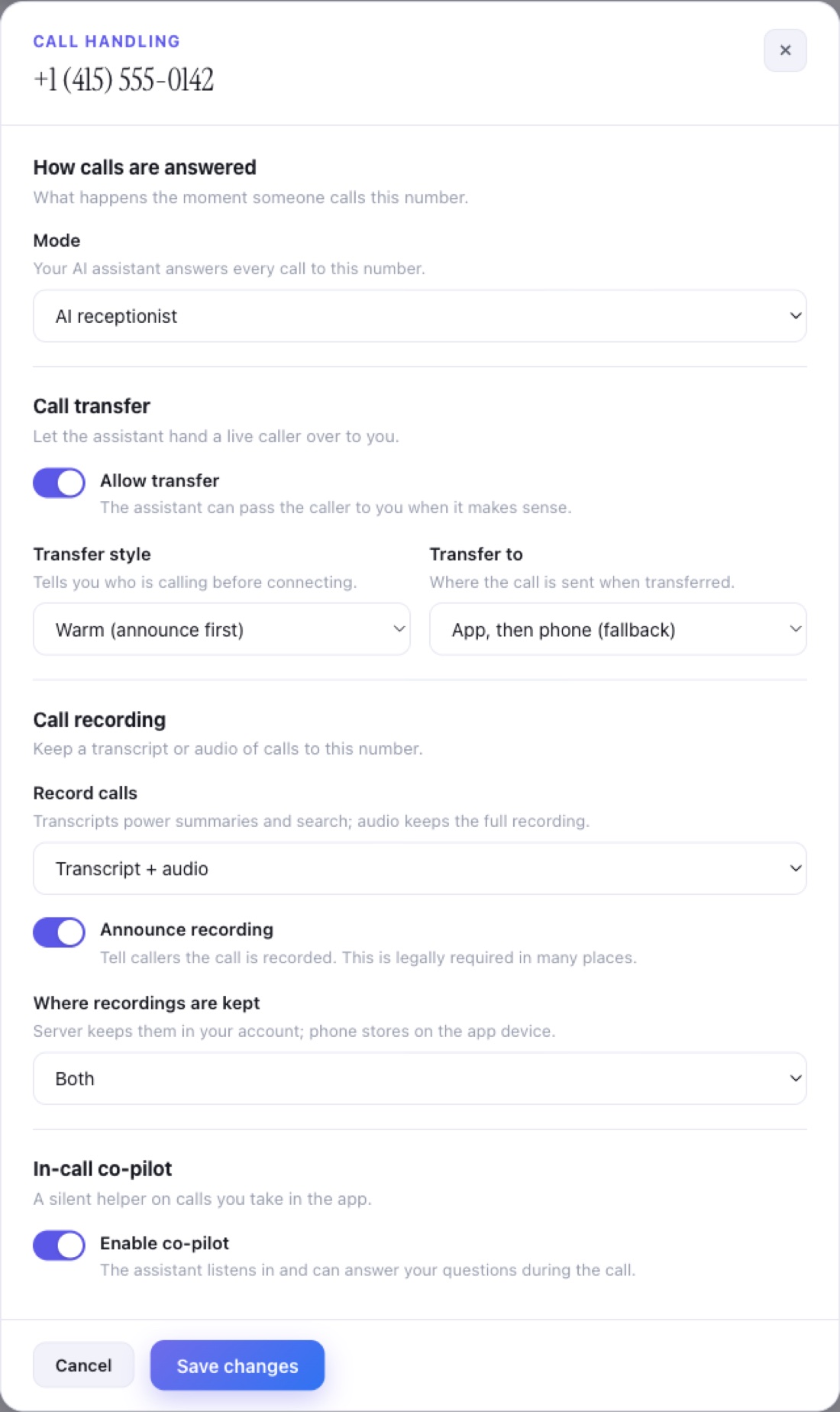
What happens when someone calls?
Each number has a mode that decides how the very first moment of a call is handled. You pick one of three. The mode applies to every call to that number until you change it.
| Mode | What it does |
|---|---|
| AI receptionist | Your AI assistant answers every call to this number. It greets the caller, answers from your business knowledge, takes messages, and books or transfers when you allow it. |
| Ring my app first | Calls ring you in the app first, so you can pick up yourself. If you miss it, the assistant steps in and handles the call. |
| Forward to a phone | Calls are forwarded straight to another phone number you choose, with no assistant in between. You enter the destination in the Forward to field. |
Most owners start with AI receptionist so nothing is ever missed, then switch to Ring my app first when they want first crack at calls themselves. You can change the mode anytime, per number.
Can it transfer a call to me?
Yes. Turn on Allow transfer and the assistant can hand a live caller over to you when it makes sense, for example when the caller asks for a person or has something the assistant cannot resolve. You control two things: the style of the transfer and where it goes.
Transfer style
- Warm (announce first): the assistant tells you who is calling before it connects you, so you are never caught off guard.
- Blind (connect immediately): the call is connected straight away, with no announcement.
Transfer destination
The Transfer to setting decides where a transferred call is sent:
- App, then phone (fallback): rings you in the app first, and falls back to your phone if you do not pick up there.
- App only: rings you in the app and nowhere else.
- Phone only: sends the call to a phone number.
Are calls recorded?
Only if you turn it on, per number. Use the Record calls setting to choose what is kept. Transcripts power your call summaries and search; audio keeps the full recording.
| Recording option | What is kept |
|---|---|
| Off | Nothing is recorded. |
| Transcript only | A written transcript of the call, used for summaries and search. |
| Audio only | The full audio recording of the call. |
| Transcript + audio | Both the written transcript and the audio recording. |
When recording is on, you can also turn on Announce recording, which tells callers the call is recorded. This announcement is legally required in many places, so leave it on unless you are sure you do not need it. You can also choose where recordings are kept: on the server in your account, on your app device (phone), or both.
Recording laws differ by country and state. In many places you must tell the caller. When in doubt, keep Announce recording on.
Recordings and transcripts show up alongside each call. See Calls for where to find and play them.
What is the in-call co-pilot?
The co-pilot is a silent helper for calls you take yourself in the app. With Enable co-pilot turned on, the assistant listens in quietly and can answer your questions during the call, like a whisper in your ear, so you have your business knowledge on hand while you talk. The caller does not hear the co-pilot. It applies to app-answered calls, so it appears when your mode is Ring my app first or when transfers can reach your app.
Where do I set all this?
It is all per number. Open Numbers, find the number you want, and open its Call handling section.
- Open NumbersGo to byourside.ai/account/numbers. Each number is a card.
- Open Call handlingOn the number's card, press Customize next to Call handling to expand the settings for forwarding, transfer, recording, and co-pilot.
- Pick how calls are answeredChoose the mode: AI receptionist, Ring my app first, or Forward to a phone. If you forward, enter the destination number.
- Set transfer, recording, and co-pilotTurn on transfer and choose its style and destination, set recording and the announcement, and enable the co-pilot if you want help on calls you take.
- Save changesPress Save changes. The settings apply to that number right away. Each number can be handled differently.
New to the Numbers page? See Numbers for how to get and manage your phone numbers.
Is forwarding to any number safe?
Forwarding and transfers are limited to protect you from toll fraud, where a stolen account is used to ring expensive international or premium-rate destinations and run up a bill. By Your Side allows forwarding to a set of allowed regions (such as the United States, Canada, the United Kingdom, Australia, and New Zealand) and blocks risky destinations. If a destination you enter is not allowed, the call will not go through, which keeps your account safe.
Common questions
What happens if I do not change anything?
A new number uses sensible defaults: the AI receptionist answers, transfer and recording are off, and there is no co-pilot. The moment you change a setting on a number, it becomes specific to that number.
Will the assistant still help if I miss a call in the app?
Yes. With Ring my app first, the assistant steps in and handles the call if you do not pick up, so callers are never left hanging.
Can different numbers be handled differently?
Yes. Every setting on this page is per number, so one number can go straight to the AI receptionist while another rings your app first or forwards to a phone.
Does the caller know the call is recorded?
Only if you turn on Announce recording. We strongly recommend leaving it on, since telling the caller is required by law in many places.
Why was my forwarding number rejected?
The destination is likely outside the allowed regions. This is the toll-fraud protection at work. Use a number in an allowed region, or email support@byourside.ai if you think it should be allowed.